:Tutorial : Vista wireless bugs walkaround
Like XP, vista does network lookup every minute causing lag, however unlike XP it can't be turned off.
This is horrible for gaming, I've been looking to get some sort of solution so I can play properly again.
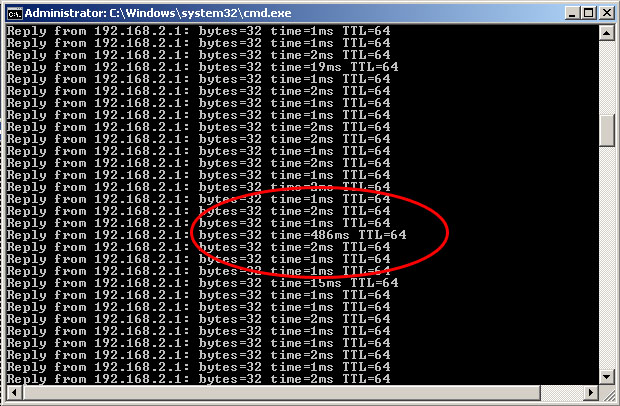
The lagspikes which happen every minute
1. WLAN Optimizer
This is the only program I found useful with my Netgear wireless USB.
The program fixed the spikes, but after a while all connection was lost (resulting in the game playing getting stuck in lag).
restarting WLAN Optimizer fixes it, but it can be annoying if you have to minimize the game and restart it every 5-10 minutes of playing.
2. Installing WLAN Optimizer
My program works with the
older 0.1 version, install it.
I recommend also trying the official
latest WLAN Optimizer from here. (I had no luck with it, but other users report success)
3. Use pingCheck.exe to handle WLAN Optimizer
I wrote a simple C++ program, which detects the above connection issue and restart WLAN Optimizer for you, while running in the background.
1.
Download pingCheck v1.2, and extract it to the same folder where WLAN Optimizer is.
(this is the new version, which runs with practically zero cpu/memory usage))
2. make a shortcut to the program.
3. use ipconfig /all, in command prompt to check for your
Default Gateway.
4. add that ip after the shortcut. (example: pingCheck.exe 192.168.2.1 800)
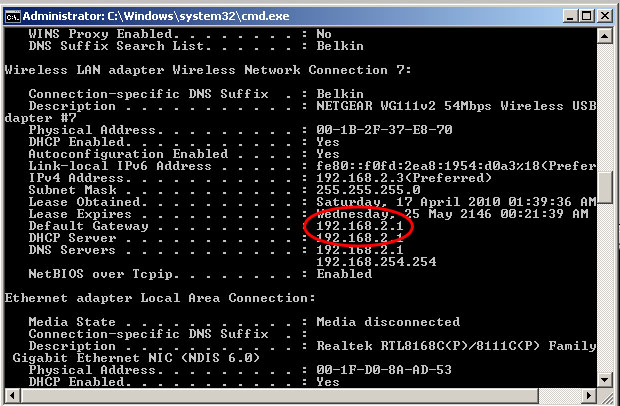
the Default Gateway, which is gotten from "ipconfig /all"
4. How it works
pingCheck simply checks ping to the router, when any issues occur it shuts down WLAN Optimizer and restarts it after a few seconds.
it also starts WLAN Optimizer for you when it launches, and exits on close.
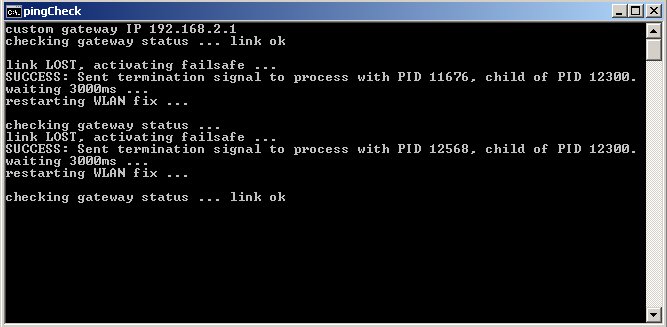
pingCheck console in action, of course easily hidden while gaming
